Common Issues
This guide can help if you experience any of the following:
Lesson completed but not marked as complete
Progress disappeared
Learning has been reset
Frequently Asked Questions
I finished the lesson, but it isn't marked as complete.
Completing the lesson content alone does not mark the lesson as complete.
To complete a lesson, you must answer and submit the Check-in Question at the end of the lesson. Once the Check-in Question has been submitted, your progress will be recorded.
How do I know my lesson has been completed?
After submitting the Check-in Question, return to the Learning page.
A green check icon will appear on top of the completed lesson, confirming that your progress has been successfully saved. Completing a lesson also unlocks the next lesson in the module.
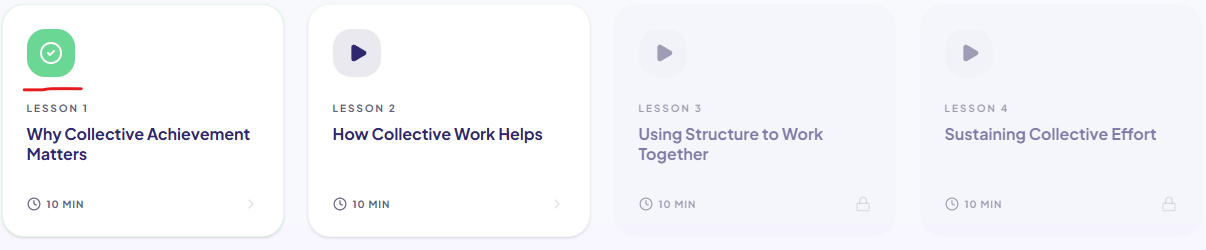
If the green check icon is not displayed, the lesson has not been completed.
My progress disappeared, or my learning was reset.
First, refresh the page by pressing F5 on your keyboard or clicking your browser's Refresh button.
Then, return to the Learning page and check whether the lesson now displays the green check icon.
If your progress is still missing, you may need to complete the Check-in Question before the lesson can be recorded as complete.
Browser interruptions
Occasionally, a temporary browser or network interruption may prevent your progress from being saved.
If this happens:
Refresh the page.
Log back into Appellon if required.
Return to the lesson and verify whether it has been marked as complete.
Still need help?
If your progress is still not being saved after following the steps above, please contact [email protected].
To help us investigate the issue, please include:
Your name and email address
The learning module and lesson name
The date and time you completed the lesson
A screenshot of the Learning page showing the lesson status (recommended)
Providing these details will help our Support team investigate and resolve the issue more quickly.